Quick Answer
Spotify AI credits are part of the growing push to make music creation details clearer for listeners, rights holders, and platforms. Artists should be ready to explain whether AI helped with vocals, composition, production, artwork, or metadata, and they should keep records that support accurate credits if a distributor or platform requests disclosure.
Key Takeaways
- AI credits are about transparency, not automatically blocking every AI-assisted track.
- Artists should document where AI was used in the creative or production process.
- Incorrect credits can create trust, policy, or rights problems later.
- Platform requirements may change, so artists should check current Spotify and distributor guidance.
Spotify AI Music Credits Explained: What Artists Must Disclose in 2026
AI music is no longer just a future problem. In 2026, it is already inside release forms, distributor checks, Spotify song credits, and artist policy discussions.
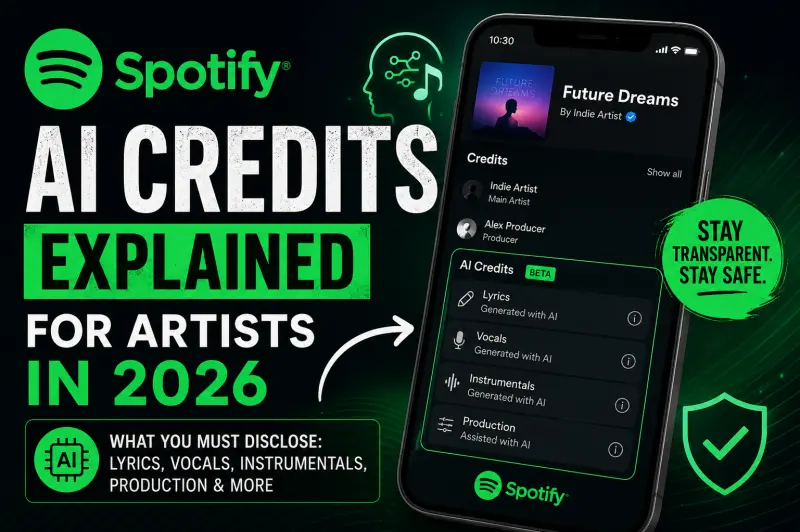
Spotify has started rolling out AI Credits, a beta feature that lets artists disclose where AI was used in a track. These credits can appear inside Spotify’s Song Credits section when AI involvement is submitted through a label, distributor, or music partner. Spotify says AI Credits apply to specific parts of a song, such as lyrics, vocals, instrumentals, or production — not automatically to the entire track.
For independent artists, this creates one big question:
If you used AI in your song, what exactly should you disclose before releasing it?
Let’s break it down clearly.
What Are Spotify AI Credits?
Spotify AI Credits are metadata credits that show how artificial intelligence contributed to a song.
Instead of simply marking a track as “AI-generated,” Spotify’s system is more specific. It can show whether AI was used in a particular creative role, such as lyrics, vocals, instrumentals, or production. Spotify’s own support page explains that AI Credits show when a specific part of a track was generated with AI, and that they apply to individual roles rather than the whole song.
That difference matters.
A song may have human vocals but AI-assisted production. Another song may have human-written lyrics but an AI-generated vocal. Another track may use AI only for instrumental elements. Spotify AI Credits are designed to make those differences clearer for listeners.
Are Spotify AI Credits Mandatory in 2026?
Right now, Spotify describes AI Credits as a beta feature and the system depends on disclosure submitted through labels, distributors, and music partners. Spotify has also said that the absence of an AI credit does not automatically mean AI was not used, because not all distributors support disclosure yet.
So the simple answer is:
Spotify AI Credits are not a universal automatic label yet, but artists should treat AI disclosure seriously.
Why? Because AI music is becoming a trust issue. Spotify is building disclosure systems, supporting DDEX-based AI metadata standards, and tightening rules around spam, impersonation, and misleading AI content.
In 2026, the safest move for independent artists is simple:
If AI played a meaningful role in your track, disclose it accurately wherever your distributor gives you the option.
What Artists May Need to Disclose
Spotify’s AI Credits currently focus on specific creative areas. These are the main categories artists should understand.
1. AI-Generated Lyrics
If your lyrics were fully generated by an AI tool, you should disclose AI involvement in the lyrics.
This includes cases where an AI tool created the main lyrical idea, full verses, chorus, hook, or complete song text. If you only used AI for brainstorming, grammar cleanup, or small wording suggestions, the situation is less clear — but if AI created a major part of the final lyrics, disclosure is the safer choice.
Example:
You type a prompt into an AI tool and it writes the full song lyrics. You then record those lyrics almost as they are. In that case, AI contributed directly to the lyrics.
This matters because lyrics are part of the composition. If AI helped create the final words that listeners hear, platforms and distributors may want that information included in credits.
2. AI-Generated Vocals
AI vocals are one of the most sensitive areas in music right now.
If you used AI to generate a singing voice, replace a vocal, clone a voice, or create a synthetic vocal performance, you should disclose AI involvement in vocals when possible.
Spotify has a separate policy around impersonation. It says music that impersonates another artist’s voice without permission can be removed, whether that impersonation is created using AI voice cloning or another method.
This is very important for independent artists.
Using AI vocals is not always the problem. The bigger risk is using AI vocals that sound like a real artist, celebrity, or recognizable singer without permission.
Safe example:
You use a licensed AI vocal tool with a generic voice model and you have rights to release the output.
Risky example:
You create a song using an AI voice that sounds like Arijit Singh, The Weeknd, Taylor Swift, Drake, or any real artist without permission.
In 2026, artists should be extra careful with AI vocals. If the voice is generated, cloned, transformed, or synthetic, keep proof of rights and disclose it properly.
3. AI-Generated Instrumentals
If AI created part or all of your instrumental, you may need to disclose AI involvement in instrumentals.
This includes AI-generated beats, melodies, guitar parts, piano sections, synth lines, background music, or full instrumental arrangements.
For example, if you used an AI music generator to create the entire backing track and then added your own vocals on top, the instrumental part is AI-generated. That should be disclosed if your distributor gives the option.
But if you only used AI as inspiration and then recreated everything manually in your DAW, the case may be different.
The key question is:
Did AI-generated audio remain in the final released track?
If yes, disclose it.
4. AI-Assisted Production
Production is another category Spotify mentions for AI Credits. Spotify’s newsroom update says AI Credits can show specific contributions such as vocals, lyrics, or production in Song Credits on mobile.
Production can include things like AI-assisted mixing, mastering, sound design, arrangement help, vocal cleanup, stem separation, or audio enhancement.
This area is more nuanced because many artists already use smart tools in production. For example, AI-assisted mastering, noise reduction, vocal isolation, and automatic EQ tools are becoming common.
A practical way to think about it:
If AI only helped with technical cleanup, minor mastering, or workflow speed, it may not be treated the same as AI generating the actual song. But if AI created major production elements that shaped the final sound, it is better to disclose it when possible.
5. AI-Generated Album Artwork
Spotify’s current AI Credits page mainly talks about track-level roles such as lyrics, vocals, instrumentals, and production.
However, artists should still be careful with AI-generated artwork. Even if Spotify AI Credits focus on music roles, your distributor, label, or another platform may ask whether artwork was AI-generated.
If your cover art was made using AI, make sure you have commercial rights to use it. Do not use AI artwork that copies a famous artist’s style too closely, includes fake brand logos, celebrity faces, copyrighted characters, or misleading visuals.
This is not only a Spotify issue. It is a distribution and copyright issue.
What You Should Not Do With AI Music
AI can be used responsibly, but there are mistakes that can create serious release problems.
Avoid these:
- Do not use another artist’s AI-cloned voice without permission.
- Do not upload mass-generated low-quality tracks just to farm streams.
- Do not hide AI use if your distributor directly asks for disclosure.
- Do not claim a fully AI-generated vocal as a real human singer.
- Do not use AI-generated music if the tool does not give you proper commercial rights.
- Do not copy a famous song’s melody, lyrics, vocal tone, or production style too closely.
Spotify has already been tightening protections around AI spam and impersonation. In September 2025, Spotify said it had removed over 75 million spammy tracks in the previous year and was working on stronger AI transparency and spam protections.
For independent artists, the message is clear:
AI tools are not banned, but misleading, spammy, or unauthorized AI use is risky.
Does Disclosing AI Hurt Your Spotify Reach?
This is the fear many artists have.
They think: “If I disclose AI use, will Spotify stop pushing my song?”
Spotify has not said that responsible AI disclosure automatically reduces reach. In fact, Spotify’s public messaging frames AI Credits as a transparency tool, not a punishment system. Spotify says its goal is to give artists who use AI tools creatively a way to share that process with listeners.
That means disclosure should not be viewed as a warning label. It is more like a credit.
A human producer gets credit. A songwriter gets credit. A vocalist gets credit. Now, if AI contributed to a specific role, that contribution can also be shown.
The bigger risk is not disclosure.
The bigger risk is hiding AI use, using unauthorized voices, or submitting content that platforms consider spam, impersonation, or misleading metadata.
How Independent Artists Should Prepare Before Release
Before uploading an AI-assisted song in 2026, follow this checklist.
Step 1: Identify Where AI Was Used
Write down exactly how AI helped in the song.
Ask yourself:
- Did AI write the lyrics?
- Did AI generate the vocal?
- Did AI create the instrumental?
- Did AI help with production?
- Did AI only help with mixing or mastering?
- Did AI create the cover artwork?
Do not think only in terms of “AI song” or “not AI song.” Think in terms of roles.
Step 2: Check Your AI Tool’s License
Before release, check whether your AI tool allows commercial use.
Some tools allow monetized distribution. Some restrict usage. Some may have unclear training data or rights policies.
Keep screenshots, invoices, subscription proof, license pages, and project files. If a distributor asks for proof later, you will be in a stronger position.
Step 3: Avoid Voice Cloning Without Permission
This is the most dangerous area.
If your AI vocal sounds like a known singer or real artist, do not release it unless you have written permission.
Spotify’s policy on impersonation is clear: music that impersonates another artist’s voice without permission can be removed.
Even if your distributor accepts the song, it may still create takedown risk later.
Step 4: Enter AI Credits Honestly
If your distributor gives you an AI Credits or AI disclosure option, fill it accurately.
Do not over-disclose randomly, but do not hide meaningful AI use either.
For example:
- AI wrote lyrics → disclose lyrics.
- AI generated vocals → disclose vocals.
- AI generated beat/instrumental → disclose instrumentals.
- AI helped create production elements → disclose production.
Spotify says these credits are submitted through labels, distributors, and music partners.
So the option may appear inside your distributor dashboard, not directly inside Spotify for Artists.
Step 5: Keep Your Metadata Clean
AI disclosure is only one part of release safety.
Bad metadata can create delays, rejections, or profile issues — especially when AI music is involved.
AI-Assisted vs Fully AI-Generated: What’s the Difference?
This difference is important.
AI-assisted music means a human artist used AI as a tool in the creative process. For example, AI helped with lyric ideas, mastering, or sound design, but the artist still made major creative decisions.
Fully AI-generated music means AI created most or all of the final song, including lyrics, vocals, instrumental, or arrangement, with minimal human creative input.
Spotify AI Credits help show the difference by identifying the specific role AI played instead of labeling the whole track in one simple way.
For independent artists, AI-assisted music is generally easier to explain and defend than fully AI-generated music — especially if you can prove rights and creative control.
Should You Mention AI Use in Your Artist Bio?
Usually, no.
AI Credits are about track-level transparency. Your artist bio is for your story, style, background, and brand.
You do not need to write “I use AI” in your bio unless AI is a major part of your artistic identity.
For most independent artists, the better approach is:
- Disclose AI use properly in release metadata.
- Keep your artist profile human, professional, and brand-focused.
- Do not mislead listeners about who performed or created the song.
Will Every Distributor Support Spotify AI Credits?
Not yet.
Spotify has said AI Credits depend on disclosure submitted through labels, distributors, and music partners. It has also noted that not all distributors enable artists to disclose yet, though Spotify intends to expand this more broadly.
So if you do not see an AI Credits option inside your distributor dashboard, it may simply mean your distributor has not added the feature yet.
Still, you should keep your own records. If your distributor adds AI disclosure later, you will know exactly what to enter.
Final Thoughts
Spotify AI Credits are not just another metadata field. They are part of a bigger shift in music distribution.
In 2026, platforms want more transparency. Listeners want to know what is real. Artists want protection from fake voice clones and AI spam. Distributors want cleaner metadata. And independent musicians need to understand how AI use affects release safety.
The best strategy is simple:
Use AI responsibly. Keep proof of rights. Avoid impersonation. Disclose meaningful AI contributions when your distributor gives you the option.
AI tools are not the enemy. But hiding AI use, cloning voices without permission, or uploading misleading content can put your music at risk.
For independent artists, transparency is becoming part of professional release strategy.
FAQ: Spotify AI Music Credits
What are Spotify AI Credits?
Spotify AI Credits show when a specific part of a song was generated with AI. They can apply to roles like lyrics, vocals, instrumentals, or production, rather than labeling the entire song as AI-generated.
Are Spotify AI Credits mandatory?
Spotify AI Credits are currently a beta feature and depend on disclosure submitted through labels, distributors, or music partners. Not all distributors support the feature yet.
What AI use should artists disclose?
Artists should disclose meaningful AI use in lyrics, vocals, instrumentals, or production when their distributor provides the option. If AI-generated audio remains in the final song, disclosure is usually the safer choice.
Can I release AI-generated vocals on Spotify?
You may be able to release AI-generated vocals if you have proper rights, but you should not use AI to impersonate another real artist’s voice without permission. Spotify says unauthorized voice impersonation can be removed.
Does Spotify ban AI music?
Spotify does not ban all AI music. The bigger issue is unauthorized impersonation, spam, misleading metadata, and unclear rights. Spotify is building AI disclosure systems while also strengthening protections against harmful AI use.
Will AI Credits reduce my Spotify streams?
Spotify has not said that responsible AI disclosure automatically reduces reach. AI Credits are presented as a transparency feature, not a punishment system.
Where do I add Spotify AI Credits?
Spotify says AI Credits are submitted through labels, distributors, and music partners. That means artists will usually add this information inside their distributor’s release form, not directly inside Spotify for Artists.
Release Your Music Globally With Last Play Distro
With Last Play Distro, artists can distribute music globally to 150+ platforms, start on a Free tier where they keep 60% royalties, or upgrade to Premium tiers where they can keep up to 95% royalties.
- Global music distribution for independent artists
- Transparent royalties with plan-based royalty splits
- No fake partner, review, rating, or inflated artist-count claims